Light Blocks
The addon allows you to see and interact with light blocks.
💡 What is it?
Light Block is an invisible block that emits light. In vanilla Minecraft it's only available through commands, but on our servers you can craft it!
Applications:
- 🏠 Lighting interiors without visible sources
- 🏰 Lighting roofs from mobs
- 🎨 Decorative building lighting
- 🌳 Lighting gardens and parks
🔨 Crafting
Light Block (level 15)
[Glass]      [Glass]       [Glass]
[Glass]      [Glow Berries] [Glass]
              [Copper Ingot]
Result: 4 light blocks (maximum brightness)
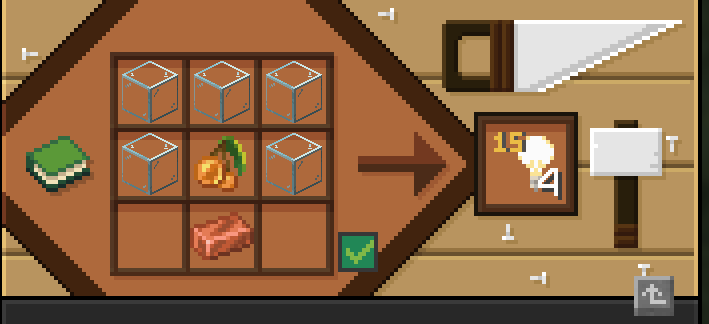
Ingredients
| Item | Amount |
|---|---|
| Glass | 5 |
| Glow Berries | 1 |
| Copper Ingot | 1 |
🔧 Changing Brightness
Use stonecutter to change brightness level:
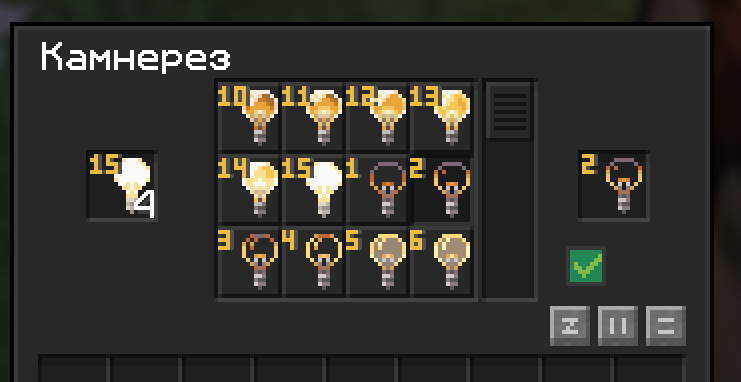
| Level | Brightness | Comparison |
|---|---|---|
| 15 | Maximum | Like torch |
| 14 | Very bright | Like glowstone |
| 12 | Bright | — |
| 10 | Medium | — |
| 7 | Moderate | — |
| 5 | Dim | — |
| 3 | Very dim | — |
| 1 | Minimum | Barely noticeable |
Combine blocks of different brightness to create smooth lighting transitions!
📖 How to Use
Step 1: Take light block in hand
Light block in hand allows you to see already placed light blocks.
Step 2: Press F
F key (swap hands) toggles visibility of light blocks in world.
Step 3: Place and break
- RMB — place light block
- LMB — break light block (when visible)
Without light block in hand you won't see placed blocks and can't break them!
💡 Usage Tips
Interior Lighting
Place light blocks in ceiling corners for even lighting without visible sources.
Mob Protection
Place light blocks on roofs and in dark places — mobs won't spawn, and lighting stays invisible.
Decorative Lighting
Use low brightness blocks (1-5) to create atmospheric lighting in basements, caves and mysterious places.
Path Lighting
Place light blocks under translucent blocks (glass, ice) to create glowing paths.
❓ FAQ
Can light block be placed in water?
Yes! Light blocks can be waterlogged. This is useful for underwater lighting.
Does light block break from water?
No, light blocks don't wash away like torches.
How to find a placed light block?
Take light block in hand and press F — all placed blocks will become visible.