Extended Crafts
This datapack adds many useful recipes for player convenience: block dyeing and light block crafting.
🎨 Block Dyeing
Recolor already dyed blocks to another color without having to craft them again!
How It Works
Surround 8 dyed blocks with the desired dye in the center:
[Block] [Block] [Block]
[Block] [Dye]   [Block]
[Block] [Block] [Block]
Result: 8 blocks of the new color
Supported Blocks
| Block Type | Example |
|---|---|
| Glass | Any stained glass → another color |
| Glass Panes | Any stained panes → another color |
| Terracotta | Any stained terracotta → another color |
| Candles | Any colored candles → another color |
Tip
This is especially useful when you've accumulated many blocks of one color but need another!
💡 Light Blocks
Create invisible light sources for decorative purposes!
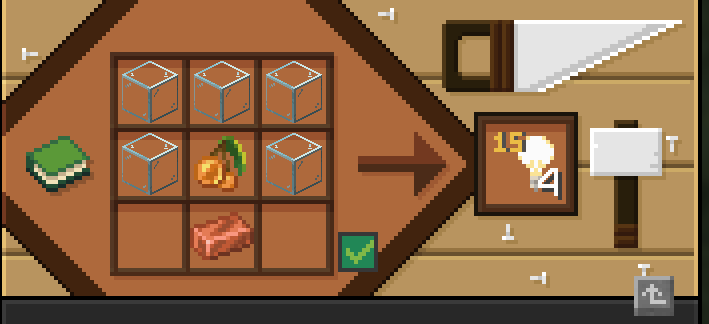
Light Block Craft (level 15)
[Glass] [Glass]       [Glass]
[Glass] [Glow Berries] [Glass]
        [Copper]
Result: 4 light blocks (level 15)
Changing Brightness
Use a stonecutter to change brightness level from 1 to 15:
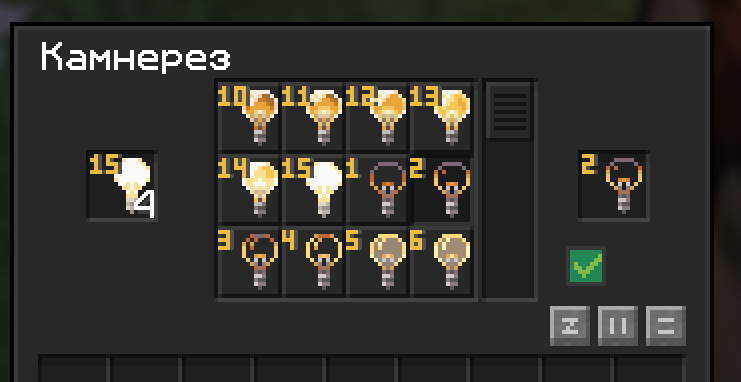
| Level | Brightness |
|---|---|
| 15 | Maximum (like torch) |
| 10 | Medium |
| 5 | Dim |
| 1 | Minimum |
How to Use
- Take a light block in hand
- Press F (or your swap hands key) to see already placed blocks
- Place and break like regular blocks
More details: Light Blocks
🖌️ Palette Brush
Special brush for the Art plugin — creating portraits on skeleton skulls.
Craft
[Cyan]   [Magenta] [Yellow]
[Black]  [Brush]   [White]
[Clay]   [Clay]    [Clay]
Result: Brush 🎨
info
This brush is used for painting player portraits. See the Art plugin in the features section for more details.